

Your motion sensor fires at 2:47 a.m. The app pushes a notification. Your phone is face-down on the nightstand, on Do Not Disturb, exactly the way it is every night.
Nothing happens.
That gap — between an alert being sent and a human being doing something about it — is the entire subject of this guide, and it’s the part almost every article about self-monitored home security skips. You’ll find dozens of pages telling you what self-monitoring costs and which brands offer it. Far fewer tell you where it breaks, how to find out whether it breaks in your house, or what your local police department will actually do when you call.
That last part surprises people. In a growing number of US cities, whether officers get dispatched to your address has less to do with your alarm brand and more to do with whether anyone can confirm a crime is happening. And under those rules, a self-monitored camera setup sometimes gets you a faster response than a traditional monitored alarm.
This guide covers the mechanics: the five things that have to go right between the sensor and the squad car, a test you can run this week to measure your own response time, and what the ordinance in your city says about all of it.
What Self-Monitored Home Security Actually Means
Self-monitored home security means you are the response center. A sensor trips or a camera detects motion, the system pushes an alert to your phone, and from that point on every decision is yours — checking the footage, deciding whether it’s real, and calling emergency services if it is.
Three terms get used interchangeably, and they’re not the same thing:
Self-monitored. A full alarm system — hub, entry sensors, siren, sometimes cameras — with alerts routed to your phone instead of a monitoring center. The siren still sounds. Nobody calls the police but you.
Unmonitored. A local-only alarm. It makes noise and that’s the whole strategy. No app, no remote alerts. Rare on modern equipment.
On-demand or hybrid monitoring. A self-monitored system with a professional monitoring plan you can switch on and off by the month. Most DIY brands now support this, and Consumer Reports notes it’s sometimes offered for as little as a single month at a time — which makes it the option people overlook most often.
What all three share is the removal of a middle layer. With professional monitoring, a trained operator receives the signal, attempts verification, and contacts dispatch. Self-monitoring deletes that operator and hands you the job. Whether that’s a smart trade depends almost entirely on whether you can actually do the job at 2:47 a.m.
The money side of this decision is a separate exercise, and it’s already broken down brand by brand in our guide to what a home security system costs across five years of ownership. This page is about the other question — whether the cheaper option still protects you when it counts.
The Five-Link Response Chain
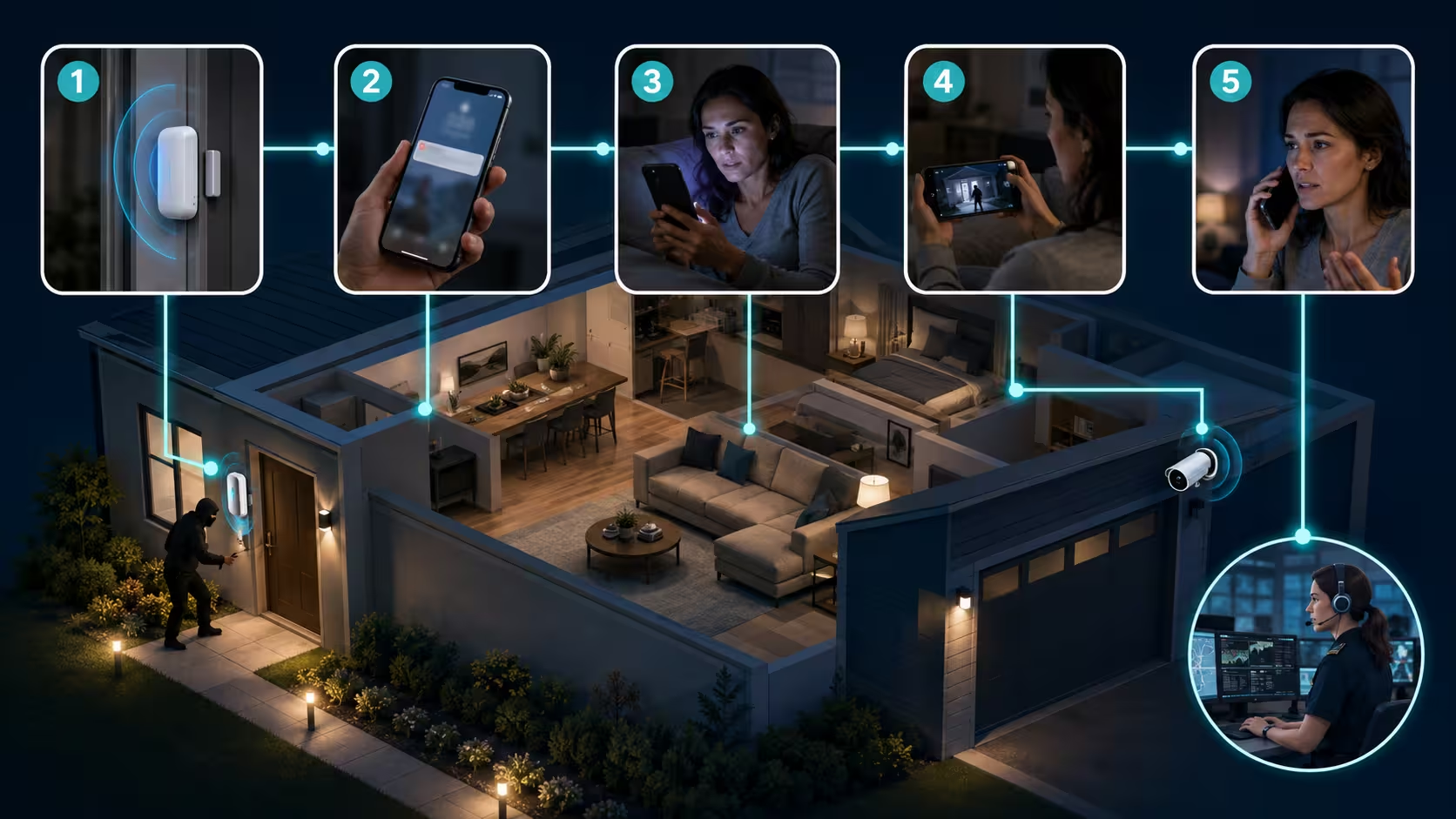
Think of self-monitoring as a chain with five links between “something happened” and “help is coming.” A professionally monitored system buys you links two through five. Self-monitoring means you own all five, and a chain is only as good as its weakest one.
| Link | What has to happen | Where it usually breaks |
|---|---|---|
| 1. Detect | The sensor or camera registers the event | Dead sensor battery, offline hub, badly tuned motion zone |
| 2. Deliver | The alert reaches your phone | Internet outage, no cellular backup, app throttled by battery saver |
| 3. Notice | You actually perceive the alert | Silent mode, Do Not Disturb, asleep, driving, in a meeting |
| 4. Verify | You confirm it’s real | Slow clip loading, no retained footage, useless night video |
| 5. Dispatch | You call 911 with something useful to say | Hesitation, no permit on file, unclear what you’re reporting |
Link 1: Detect
The equipment layer, and the one buyers obsess over most while it fails least. Wireless sensor batteries typically need replacing every one to three years, and they die quietly — no alarm sounds to tell you an alarm can’t sound. Most apps show sensor health somewhere in a settings menu almost nobody opens.
The subtler failure here is tuning. A street-facing camera with no activity zones will send you forty alerts a day about passing cars, and within a week you’ll have learned to swipe them away without looking. A system that trains you to ignore it has already failed at link three, and it failed at link one to get there.
Link 2: Deliver
Push notifications travel over the internet. If your router is down, so is your security system’s ability to reach you — the siren still works, the recording may still work locally, but you won’t know anything is happening.
This is the strongest argument for cellular backup, which most DIY brands sell for a few dollars a month. It’s also worth knowing that aggressive battery optimization on Android and Focus modes on iOS can delay or suppress notifications from apps the operating system decides are idle. Security apps are exactly the kind of app that sits idle for weeks at a time.
Link 3: Notice
This is the weak link. Not the equipment, not the app — you.
Every ranking guide describes this step as though noticing an alert is automatic. It isn’t. Roughly a third of your life is spent asleep, and the hours when residential break-ins are most disruptive are also the hours when your phone is silenced. Add commuting, showers, meetings, movies, and flights, and the honest question isn’t whether you’ll miss an alert. It’s what fraction of alerts you’d catch.
Nobody publishes that number, because nobody measures it. Which brings us to the next section.
Link 4: Verify
You’ve seen the alert. Now you need to know whether it’s a person or a raccoon, because you’re about to tell a 911 operator which one it is.
Verification speed depends heavily on where footage lives. Clips stored on a microSD card inside the camera are pulled over your local Wi-Fi, which is noticeably slower to load than cloud playback — a real trade-off when you’re trying to confirm an intrusion in under a minute, and one worth weighing when you’re choosing among cameras that store footage locally with no monthly plan.
Night footage is the other common failure. A camera that produces perfectly usable daytime video can produce an unrecognizable grey smear after dark, which leaves you looking at motion you can’t identify and no basis for calling anyone.
Link 5: Dispatch
The last link is the one with rules attached, and those rules are local. What you say, whether your address is registered, and whether you can describe an actual crime all change what happens next. That’s the whole of the next major section.
The Cold Alert Test: Measuring Your Own Response Time
Here’s a way to find out where your chain breaks, and it takes a week.
The protocol:
- Ask someone in your household to trigger an entry sensor or walk through a camera zone at a random time within the next seven days, without telling you when.
- When the alert lands, note the timestamp on the notification.
- Note the time you were ready to dial 911 with a specific description of what you saw.
- The difference between those two timestamps is your real response time.
- Run it a second time, scheduled for after 11 p.m.
Reading the results:
| Result | What it means |
|---|---|
| Under 60 seconds, day and night | Self-monitoring is a legitimate choice for your household |
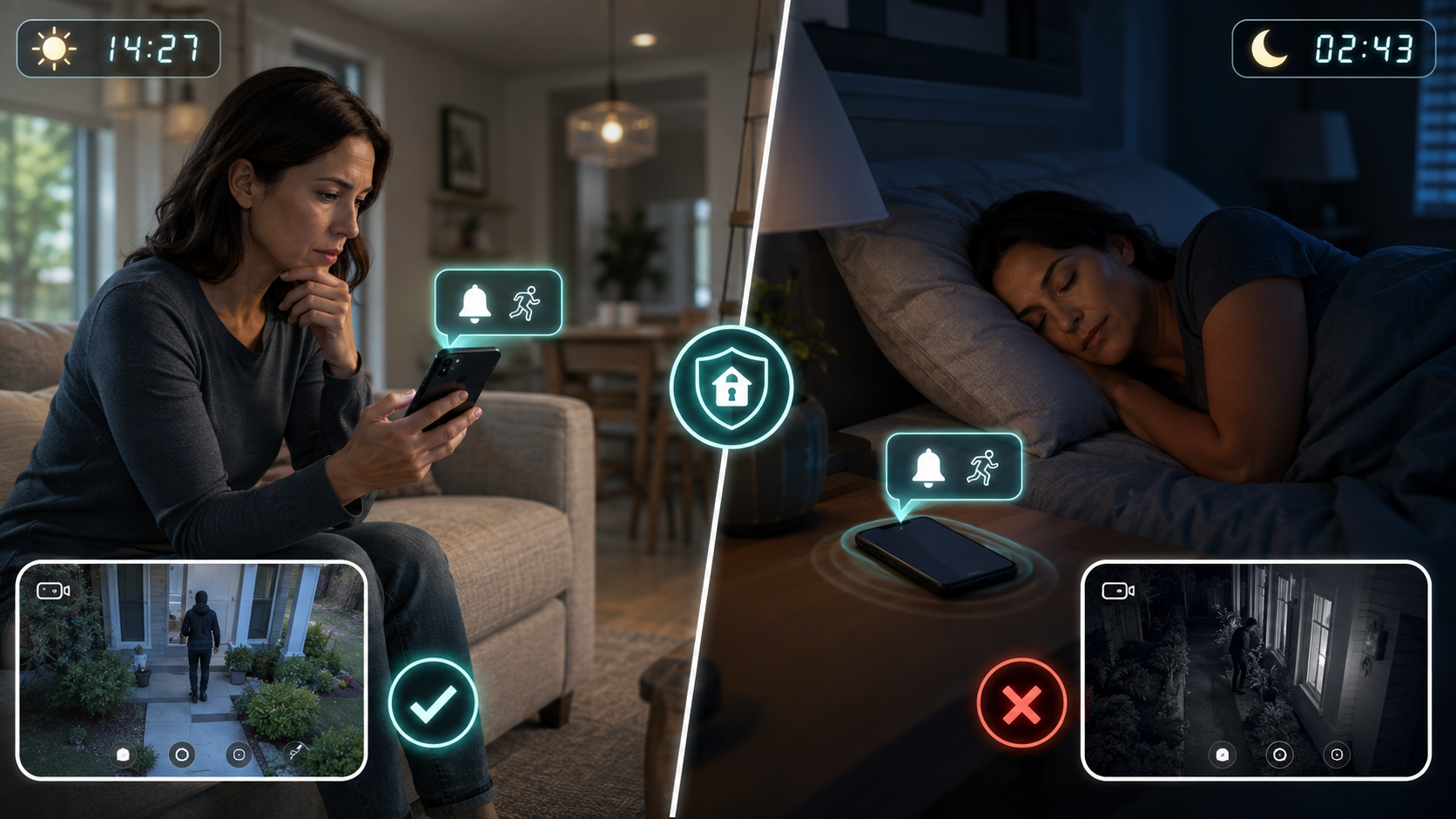
| Under 60 seconds by day, missed at night | You have a coverage window, not a security system — fix link 3 or add night-hours monitoring |
| Over 3 minutes either time | Your bottleneck is verification. Check footage retention and night video quality |
| Alert never arrived | Link 1 or 2 failure. Check sensor batteries, hub connectivity, and app notification permissions |
Two things usually show up. The daytime number is often better than people expect — 20 to 40 seconds is common for someone with their phone in hand. The night number is often not a number at all. It’s “never,” because the phone was silent.
That result isn’t a reason to abandon self-monitoring. It’s a reason to fix link three specifically, which costs nothing: most security apps support critical or time-sensitive alerts that bypass Do Not Disturb, and every major system lets you add a second person to the account so alerts land on two phones instead of one. A relative in a different time zone is a genuinely useful second responder.
Run the test again after making changes. A security setup you’ve measured is a fundamentally different thing from one you’ve assumed.
Will Police Actually Respond to a Self-Monitored Alarm?
This is where the received wisdom gets things backwards.
The standard framing is that self-monitoring is the weaker option because there’s no professional making the call. In cities that have moved to verified response, the professional making the call is often the part that gets ignored.
Why cities changed the rules
The numbers behind these ordinances are stark. According to the City of Sandy Springs, more than 99 percent of calls from alarm monitoring companies are false alarms, and roughly 18 percent of all calls into the city’s 911 center originate from alarm companies. Tulsa reports that more than 95 percent of all security alarms are false, and that its 911 center handled over 14,000 alarm-activation calls in 2016 with fewer than five percent turning out to be real intrusions.
Faced with that, a number of cities stopped treating an alarm signal as sufficient reason to send an officer.
What verified response means for you
Sandy Springs adopted its True Verification standard in June 2019. Under it, an intrusion alarm must be verified by audio, video, or private guard response before police dispatch will occur. Fire, panic, duress, holdup, and medical alarms are exempt and always get a response.
Three details matter for anyone self-monitoring:
Self-monitored systems are covered by the same requirement. The city states plainly that intrusion alarms must include audio or video verification to be eligible for police dispatch regardless of whether the system is professionally monitored or self-monitored. Self-monitoring is not an exemption.
Your own eyes count as verification. The ordinance’s definition of a verified alarm includes confirmation by the alarm user at the site or through self-monitored audio or video equipment. A camera you watch yourself satisfies the standard.
You call directly. Users with self-monitored systems request public safety response by dialing 911 from within city limits. No middle layer, no delay while an operator works through a call list.
Fremont, California operates a similar policy and spells out the consequence for everyone else: verification can come from sound, video, a panic button, or an eyewitness account indicating a crime is occurring, and all non-verified alarms reported to the department receive a lower-priority BOL response — officers respond at their discretion if they’re in the area and available.
Tulsa puts the comparison in the sharpest terms. The city states that 911 calls from citizens witnessing a break-in are priority calls and receive higher priority than alarm calls, and that if an alarm is triggered without a permit and without verification, no police response will follow.
Read those together and the conclusion is uncomfortable for the industry: a homeowner watching a live camera feed and calling 911 is a higher-priority caller than a monitoring center relaying a sensor trip. Self-monitoring isn’t automatically weaker at link five. In verified-response cities it can be stronger — provided you’re awake, which loops right back to link three.
Permits, registration, and false alarm penalties
The rules vary more than almost anything else in home security, and they apply to self-monitored systems more often than buyers realize.
- Fremont, CA requires a permit for any alarm system that is monitored or audible, which captures self-monitored systems with a siren. A new permit costs $40 and is valid for two years; renewal is $20.
- Tulsa, OK doesn’t mandate registration, but the consequences of skipping it are steep. Residential certificates cost $35 annually, and a second false alarm in a certificate year gets the certificate cancelled ten days after written notice. Without a certificate, police won’t respond unless a person actually witnesses the cause of the activation and calls 911 with that information.
- Sandy Springs, GA flips the usual model — alarm companies register their customers’ systems rather than users registering themselves, and false alarm fines are assessed to the alarm company, which may pass them on to customers.
Three cities, three completely different systems. Which is exactly why the next section exists.
How to Check Your City’s Alarm Rules in Five Minutes
Do this before you buy, not after your first false alarm.
Search these, in order:
"[your city]" alarm permit site:.gov"[your city]" false alarm ordinance"[your county]" verified response alarm
The page you want is usually hosted by the police department, the finance or business licensing department, or occasionally a third-party alarm administrator the city contracts with.
Five questions to answer:
- Is a permit or registration required, and does it apply to audible systems as well as monitored ones?
- What does it cost and how often does it renew?
- Does the city require verification before dispatching to an intrusion alarm?
- What counts as verification — does homeowner video qualify?
- What’s the false alarm penalty schedule, and does it suspend response or just charge a fee?
If you can’t find it: call the non-emergency police line and ask for the alarm administrator. Every city with an ordinance has someone whose job this is. Five minutes on the phone beats discovering the rules through a fine.
Who Self-Monitoring Genuinely Fits
Self-monitoring works well for a specific profile, and it’s worth being honest about who’s in it:
- Renters and apartment dwellers. One or two entry points, portable equipment, no interest in a contract tied to a unit you’ll leave in a year.
- People who work from home. Link three is nearly always intact during the hours the house would otherwise be empty.
- Light sleepers with critical alerts configured. The night failure is fixable if you fix it deliberately.
- Households with a second responder. A partner on opposite shifts, or a family member in another time zone, covers the hours you can’t.
- Anyone in a verified-response city with good camera coverage. You meet the dispatch standard directly, and your call outranks an alarm company’s.
- Buyers who want a system now and monitoring later. Most DIY platforms let you add professional monitoring by the month without new hardware.
Who Should Not Self-Monitor
Equally worth being direct about:
- Frequent travelers. A phone in a different time zone, possibly on airplane mode, is not a monitoring center.
- Second homes and rentals you don’t occupy. The whole model depends on someone being reachable and reasonably nearby.
- Households with children or elderly parents at home alone. Self-monitoring protects property adequately. Situations where a person may be in the house during an incident are exactly where a dedicated dispatch chain earns its cost.
- Heavy sleepers who won’t configure critical alerts. If you know you won’t do it, plan around that rather than hoping.
- Anyone whose Cold Alert Test came back “never.” The test told you something. Believe it.
- Anyone who needs the insurance discount. Most insurers tie discounts to professional monitoring specifically, since they’re paying for a documented response rather than hardware ownership.
Closing the Gaps Without Paying for Full Monitoring
If you’re on the fence, these are the cheapest fixes with the biggest effect on the chain, roughly in order of value per dollar:
Turn on critical or time-sensitive alerts. Free. Fixes the single most common failure. Do this before anything else on this list.
Add a second person to the account. Also free. Two phones is a genuinely different risk profile from one, especially if the second person keeps different hours.
Add cellular backup. A few dollars a month on most platforms. Keeps link two intact during internet outages, which is also when a system is most likely to be tested.
Fix your activity zones before you add cameras. Alert fatigue destroys more self-monitored systems than hardware failure does.
Toggle professional monitoring for travel months only. No-contract DIY brands generally allow month-to-month activation. Before you decide whether that’s worth it, run your own setup through the home security system cost calculator — the monthly figure reads differently once you’re only paying it four months a year instead of twelve.
Register your alarm. Cheap, annual, and in some cities the difference between a dispatch and a BOL.
FAQ
Does self-monitored home security qualify for a homeowners insurance discount? Usually not on its own. Most insurers require professional monitoring because they’re crediting a documented, guaranteed response rather than the presence of equipment. Some carriers do offer smaller discounts for cameras or environmental sensors — worth a direct call to your insurer, since policies vary more than the marketing suggests.
Do I need an alarm permit if I self-monitor? It depends entirely on your city, and the answer is yes more often than people expect. Fremont, California requires a permit for any system that’s monitored or audible, which includes a self-monitored setup with a siren. Other cities make registration optional but withhold police response from unregistered systems. Check before you install.
Will police respond if I call 911 about my own camera footage? In most places, yes — and often at higher priority than an alarm-company call. Tulsa states directly that 911 calls from citizens witnessing a break-in are priority calls ranked above alarm calls. Sandy Springs counts homeowner video as valid verification. Describe what you actually see rather than saying your alarm went off.
What happens if my Wi-Fi goes down? The siren still sounds and most systems with local storage keep recording. What stops is remote alerts and live viewing, since both travel over the internet. Cellular backup, sold by most DIY brands for a few dollars a month, is the fix.
Can I switch to professional monitoring later without buying new equipment? On most DIY platforms, yes. Self-monitoring and professional monitoring generally run on the same hardware with a different plan attached, which is what makes month-by-month toggling practical for travel.
Is a camera-only setup the same as a self-monitored security system? No, and conflating the two is a common mistake. Camera-only systems have no entry sensors, no keypad, and no siren — they record and alert, but they don’t detect an opened door or make noise that pushes someone back out. Cameras are one layer, not the system.
How many false alarms before my city stops responding? Fewer than most people assume. Tulsa cancels a residential alarm certificate after a second false alarm in a certificate year. Other cities escalate through fees first. Look up your specific schedule — it’s usually on the same page as the permit application.
What to Do Next
Run the Cold Alert Test this week, both a daytime and a post-11 p.m. trial. That number is the only honest input to this decision, and it takes seven days and no money to get.
Then look up your city’s alarm ordinance and answer the five questions above — permit requirement, cost, verification standard, what counts as verification, and the false alarm penalty schedule.
If your test comes back under a minute both times and your city accepts homeowner video as verification, self-monitoring is a defensible choice and you can stop paying for something you’d never use. If the night result is “never,” fix link three before you spend anything on hardware. And if you travel often or someone is home who couldn’t respond alone, the monthly fee is buying you the four links you can’t cover yourself — which is a different purchase than the one the price comparison suggests.
Sources
- City of Sandy Springs — Alarm Ordinance
- City of Sandy Springs — Dispatch Guidelines for Alarm Monitoring Companies
- Fremont Police Department — Alarm Permit Program and False Alarm Ordinance
- City of Tulsa — Alarm Permits
- City of Austin — Alarm Administration
- Consumer Reports — Home Security System Buying Guide

Baldeep builds and researches content sites full time. For ReadLikePro he
compiles home service pricing from contractor quotes, industry cost surveys,
and public data, then checks the numbers against more than one source before
publishing. He isn’t a licensed contractor, so every estimate here is a
research-backed range, not a quote for your specific job.