

Here’s a number worth sitting with before you buy a security camera: a single cloud storage plan at $10 a month costs you $360 over three years. Add a second camera brand with its own plan, and you’re spending more on video storage than on the cameras themselves.
That’s exactly why searches for the best home security camera without subscription keep climbing. Homeowners aren’t against paying for hardware. They’re tired of hardware that’s held hostage by a monthly fee.
The good news? Skipping the subscription no longer means settling for grainy footage or missing alerts. Brands like TP-Link Tapo, Eufy, Reolink, Lorex, and Wyze now ship cameras with local storage, free smart detection, and video quality that competes head-to-head with subscription-first brands like Ring and Nest.
The catch — and there’s always a catch — is that “no subscription” means different things depending on the brand. Some cameras work fully out of the box. Others quietly require a $35 hub or a memory card you have to buy separately. A few lock their most useful features behind a paywall anyway.
This guide breaks down which cameras genuinely work without monthly fees, what each one costs over three years, and the traps that catch most first-time buyers.
Why Security Camera Brands Push Subscriptions So Hard
Understanding the business model helps you shop smarter.
Camera hardware has thin profit margins. Recurring cloud storage revenue is where the real money sits, which is why brands like Ring and Google Nest design their ecosystems around it. According to research from SafeHome.org, most Ring cameras don’t support local storage at all — recording footage requires a Ring Protect plan, which runs about $9.99 per month for unlimited cameras as of 2026.
That’s not automatically a bad deal. Ring’s cloud plans store up to 180 days of video events, far more than most competitors. But it does mean a “cheap” $60 Ring camera isn’t actually cheap. It’s a $60 camera plus a $120-per-year commitment for as long as you own it.
Cameras built for subscription-free operation flip that model. You pay slightly more upfront — usually for a microSD card slot, onboard storage, or a local hub — and then the ongoing cost drops to zero.
Given that FBI Crime Data Explorer figures for 2024 show over half of all reported burglaries happened at residences, with more break-ins occurring during the daytime than at night, a camera that records reliably without depending on a paid cloud plan — or a working internet connection — is a genuinely practical choice, not just a frugal one.
That said, this guide isn’t a substitute for a full home security plan. Cameras deter and document; they don’t lock doors or trim the shrubs a burglar could hide behind. Treat cameras as one layer of a broader setup, not the whole plan.
What “No Subscription” Actually Means: 3 Traps to Avoid
Before the picks, three things that trip up almost every buyer.
Trap 1: Local storage that needs extra hardware
Some cameras advertise free local storage but require an add-on to use it. Blink cameras are the classic example — local recording works, but only after you buy a Sync Module 2 (around $35) and plug in a USB flash drive, sold separately. Neither comes in the box with most Blink cameras.
That’s still cheaper than years of cloud fees. But budget for it upfront.
Trap 2: “Free” cameras with features locked behind a paywall
A camera can technically work without a subscription while gating the features you actually bought it for. Person detection, activity zones, rich notifications, and video history are the usual suspects. Always check which smart alerts are free before buying — not just whether the camera “works.”
Trap 3: Cloud-only brands marketed alongside no-fee cameras
Retail listings mix everything together. A Ring Indoor Cam sitting next to a Tapo C120 on the same shelf looks like an equivalent product. It isn’t. One records for free forever; the other needs a monthly plan to store a single clip. Read the storage spec, not the marketing copy.
Best Home Security Cameras Without a Subscription in 2026
A note on methodology, because honesty matters more than fake authority: the picks below are built from Consumer Reports’ published lab testing of home security cameras, manufacturer storage specifications pulled directly from each brand’s spec sheets, and patterns that show up repeatedly across verified retail owner reviews. Nobody, including large publishers with test labs, has personally installed every camera on every list they publish. Where a specific claim traces back to lab data rather than a spec sheet, that’s noted in the text.
Quick Comparison Table
| Camera | Best For | Free Local Storage | Free Smart Detection | Typical Price (2026) |
|---|---|---|---|---|
| TP-Link Tapo C120 | Best overall value | microSD up to 512GB | Person, pet, vehicle | $30–$40 |
| Eufy Indoor/Outdoor Cams (S-series) | Privacy-focused local AI | Onboard encrypted + HomeBase | Person, pet, vehicle | $50–$220 |
| Reolink E1 Zoom | Best indoor camera | microSD + 7 days free cloud (1 cam) | Motion, person | $50–$70 |
| Lorex 4K Spotlight | Most storage included | 32GB microSD in the box, up to 256GB | Person, vehicle | $90–$130 |
| Wyze Cam v4 | Tightest budget | microSD | Motion (some AI free) | $30–$40 |
| Blink Outdoor 4 | Wire-free battery cam | USB via Sync Module 2 (~$35 extra) | Motion | $60–$100 + module |
| TP-Link Tapo D225 | Best video doorbell | microSD up to 512GB | Person, pet, package, vehicle | $80–$120 |
Prices fluctuate with sales; treat these as 2026 ballpark ranges, not quotes.
TP-Link Tapo C120 — Best Overall No-Subscription Camera
If you want one recommendation and zero homework, this is it.
The Tapo C120 records to a microSD card up to 512GB with nothing gated behind a paywall that affects day-to-day security. Person, pet, and vehicle detection are all free. Consumer Reports’ testing of TP-Link’s Tapo line consistently returns high scores for video quality, response time, and — notably — data security, which is where many budget cameras fall apart.
The optional TapoCare cloud plan exists, but it only adds conveniences like cloud backup and snapshot previews in notifications. Skip it and you lose nothing essential.
Watch out for: microSD cards aren’t included. Budget $15–$25 for a decent 256GB card, and buy a “high endurance” card rated for continuous recording — standard cards wear out fast under 24/7 video writes.
Eufy S-Series — Best for Privacy and Local AI
Eufy’s whole pitch is local processing. Its cameras run AI detection on the device itself and store footage in encrypted onboard storage, with the option to expand via a HomeBase S380 hub and your own hard drive. Consumer Reports gives Eufy hardware strong data security scores partly because footage never has to touch the cloud at all.
For outdoor coverage, the eufyCam S3 Pro is the standout — SafeWise’s 2026 no-subscription camera rankings name it the top outdoor pick in that category, specifically for its no-fee operation.
Watch out for: the HomeBase hub adds real cost if you want expanded storage, and clip retrieval over Wi-Fi from onboard storage is slower than cloud playback. If you need to pull footage fast after an incident, that lag is a genuine trade-off.
Reolink E1 Zoom — Best Indoor Camera Without Monthly Fees
Reolink has quietly become the enthusiast favorite in this category, and the E1 Zoom shows why. Pan, tilt, 3x optical zoom, microSD storage, and almost nothing locked behind a paywall.
The unusual perk: Reolink includes seven days of free cloud storage for one camera — better than most brands’ free tiers — so you get a cloud backup safety net without paying for it.
Watch out for: it’s an indoor camera. For outdoor Reolink options, look at the Argus line, which follows the same no-fee philosophy.
Lorex 4K Spotlight — Best If You Hate Buying Accessories
Lorex is one of the only brands that puts a microSD card (32GB) in the box with every camera, and its cameras accept cards up to 256GB. Combined with 4K resolution, that makes Lorex the strongest pick for people who want maximum recording detail with zero extra purchases and zero fees. There’s no storage subscription to even decline — the Lorex Classic app simply doesn’t have one.
Watch out for: the included 32GB card fills up quickly at 4K. Plan to upgrade it eventually.
Wyze Cam v4 — Best Under $40
The Wyze Cam v4 is the cheapest credible entry point into subscription-free home monitoring. Slot in a microSD card and it records continuously or on motion events for free.
Watch out for: Wyze has shifted more AI features toward its paid plan over the years, and the company has had publicized security incidents in the past. It’s a fine budget camera for a hallway or garage. I wouldn’t make it the backbone of whole-home security.
Blink Outdoor 4 — Best Wire-Free Battery Camera (With an Asterisk)
Blink’s battery cameras routinely run one to two years on AA lithium cells, which makes them the easiest outdoor install in this roundup — no wiring, no solar panel, no ladder gymnastics near an outlet.
The asterisk: local storage requires the Sync Module 2 and a USB drive, roughly $45–$55 in extra hardware. Factor that into the real price before comparing.
Watch out for: without the module, Blink pushes you toward its cloud plan. Buy the camera and module together or don’t buy Blink.
TP-Link Tapo D225 — Best Video Doorbell Without a Subscription
Video doorbells are the hardest category to de-subscribe, because Ring and Nest dominate shelves and both are cloud-first. The Tapo D225 is the exception worth knowing about: a 180-degree head-to-toe view, free person/pet/package/vehicle detection, local recording to a microSD card up to 512GB, and a rechargeable battery TP-Link rates at up to eight months per charge — with the option to hardwire it for 24/7 recording.
Honorable mention: the Nest Doorbell (battery) gives you Google’s excellent smart detection for people, packages, animals, and vehicles free — but it stores only short event clips without a plan, and facial recognition stays paywalled. Fine for casual use; not true subscription-free recording.
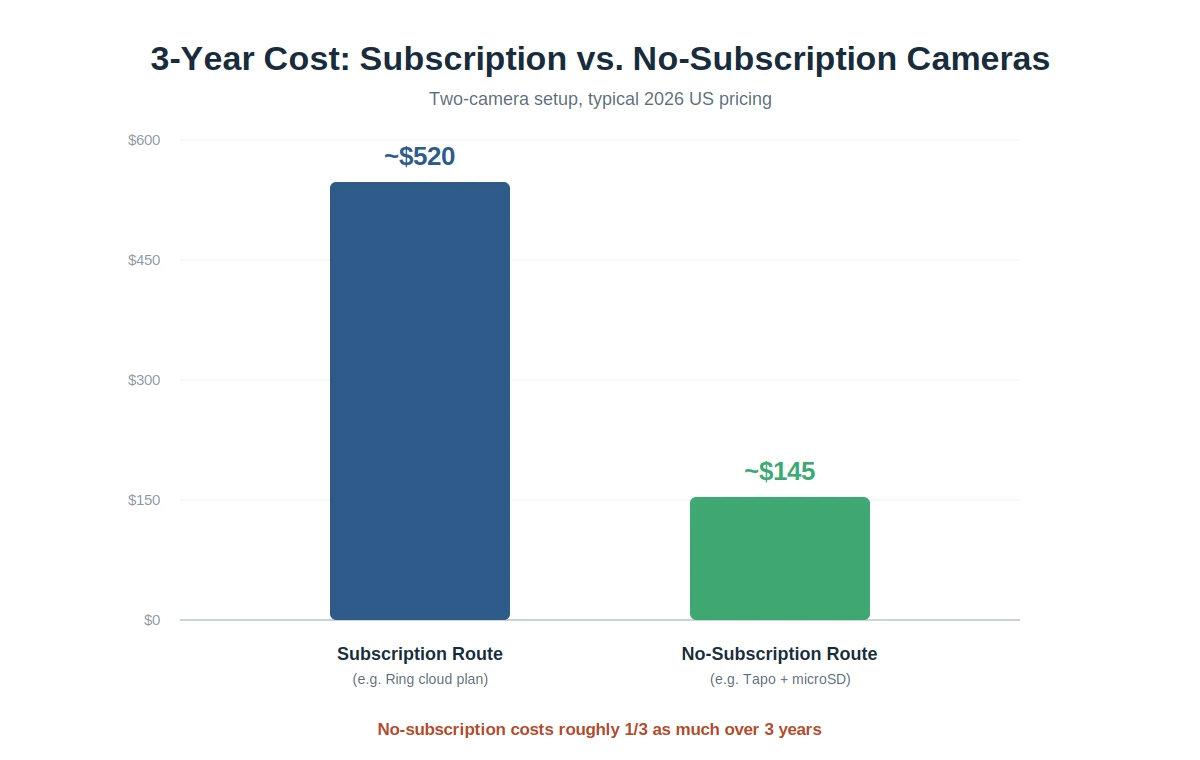
The Real Math: 3-Year Cost With vs. Without a Subscription
This is the table most roundups skip, and it’s the one that actually settles the decision. Assume a two-camera setup.
| Cost Item | Subscription Route (e.g., Ring) | No-Subscription Route (e.g., Tapo) |
|---|---|---|
| Two cameras | ~$120–$200 | ~$70–$90 |
| Storage plan, 3 years (~$10/mo) | ~$360 | $0 |
| microSD cards (2× high endurance 256GB) | $0 | ~$40 |
| Extra hub hardware | $0 | $0 (Tapo) / ~$50 (Blink) |
| 3-year total | ~$480–$560 | ~$110–$180 |
Cost figures reflect typical 2026 US pricing. The no-subscription route runs roughly one-third the total cost over three years — and the gap keeps widening every year after that, because the subscription never stops and the SD card never charges you again.
There are legitimate reasons to pay for cloud storage anyway. If a burglar steals the camera, cloud footage survives; an SD card walks out the door with the thief. Cloud plans also make sharing clips with police easier. Just make that choice deliberately, with the math in front of you, rather than defaulting into it because the box was cheap.
If you’re pricing out a bigger setup than one or two standalone cameras — sensors, a monitored panel, multiple cameras with a monitoring plan — that’s a different budgeting exercise than what’s covered here. Our breakdown of home security system cost by brand, size, and install type covers equipment packages, monitoring tiers, and the 5-year total most brand comparisons leave out.
How to Choose: Local Storage Types Explained
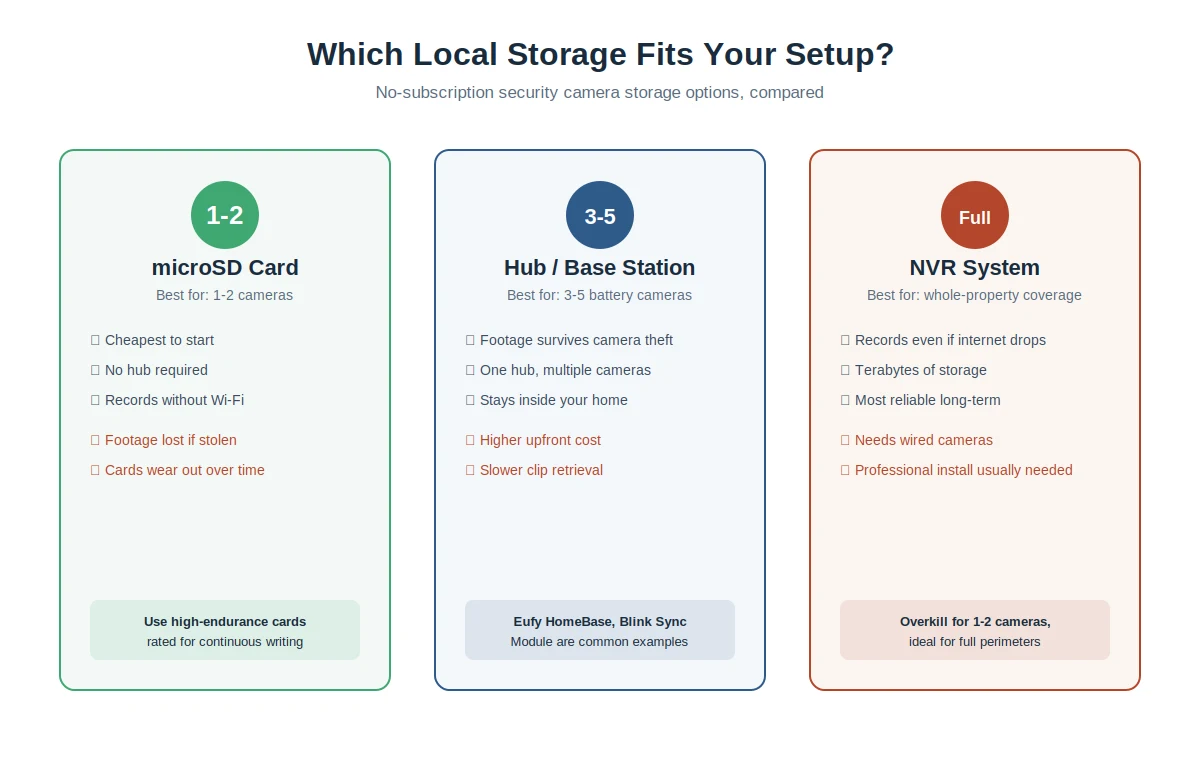
Three storage approaches dominate no-fee cameras, and picking the right one matters more than picking the “best” camera.
microSD card (in-camera). Simplest and cheapest. The card lives inside the camera and records on a loop, overwriting old footage when full. Downsides: theft/vandalism takes your footage with it, and cheap cards fail under constant writes. Buy high-endurance cards, always.
Hub or base station storage. Cameras send footage to a hub inside your home (Eufy HomeBase, Blink Sync Module). Footage survives even if the camera is stolen, and one hub serves multiple cameras. Costs more upfront.
NVR (Network Video Recorder). The heavy-duty option — wired cameras recording 24/7 to a dedicated recorder with terabytes of space. Overkill for one or two cameras, but the most reliable setup for whole-property coverage, and it keeps recording even when your internet goes down. The trade-off is installation: wired cameras usually mean running new cable and sometimes a dedicated circuit, which is an electrician’s job, not a weekend DIY project. Our electrical cost calculator breaks down what a new circuit or additional outlet typically runs before you get a quote.
A quick rule of thumb: one or two cameras, go microSD. Three to five battery cameras, get a hub-based system. Full perimeter coverage on a larger property, price out an NVR kit from Lorex or Reolink.
Setup Tips That Actually Matter for Self-Monitored Cameras
Skipping professional monitoring means the camera’s alerts land on your phone and nowhere else. A few habits close that gap:
- Set activity zones on day one. Untuned motion alerts from a street-facing camera will train you to ignore notifications within a week — which defeats the entire purpose.
- Enable two-factor authentication on the camera app. Consumer Reports flags data privacy as subpar across most camera brands it tests; strong login security is the part you control.
- Test your night footage before you need it. Stand at your property line after dark and check whether the recording could actually identify a face. Repositioning a camera ten feet often matters more than upgrading it.
- Check the SD card monthly. Cards fail silently. Most camera apps show storage health — glance at it when you change your furnace filter.
- Point one camera at the front door zone. FBI-reported data consistently shows daytime residential burglaries outnumber nighttime ones, and entries through the front of the home are far more common than movie-style window break-ins.
FAQ: Home Security Cameras Without a Subscription
Do security cameras really work without a subscription?
Yes — as long as the camera has local storage (a microSD slot, onboard memory, or a hub). Brands like TP-Link Tapo, Eufy, Reolink, Lorex, and Wyze record, send motion alerts, and allow live viewing with no monthly plan. Cloud-first brands like Ring are the exception: most Ring cameras can’t store recordings without a paid plan.
Which security camera brand has no monthly fee at all?
Reolink and Lorex come closest to a true zero-fee experience — Lorex even includes the microSD card in the box and has no storage plan to upsell. TP-Link Tapo and Eufy also run fully free, with optional cloud plans you can ignore.
Do Blink cameras need a subscription?
Not strictly, but local storage requires buying a Sync Module 2 (~$35) plus a USB flash drive separately. Without that hardware, Blink cameras only store footage through a paid cloud plan.
Is local storage safer than cloud storage?
It’s more private — footage never leaves your home, which is why privacy-focused buyers prefer Eufy’s encrypted onboard storage. But it’s more vulnerable to theft: a stolen camera means stolen footage. Hub-based storage splits the difference, keeping recordings inside your house even if the camera disappears.
What size microSD card do I need for a security camera?
For motion-triggered recording, 128GB comfortably holds weeks of clips. For 24/7 continuous recording at 2K, go 256GB or larger. Choose “high endurance” cards designed for constant rewriting — a standard card can fail within months in a security camera.
Do no-subscription cameras work without Wi-Fi?
Recording continues locally without internet on most microSD and NVR systems — that’s one of their quiet advantages. You will lose remote viewing and phone alerts until the connection returns, though, since those travel over the internet.
What do I give up by skipping the subscription?
Usually three things: off-site footage backup (protection against camera theft), extended video history measured in months, and on some brands, premium AI features like facial recognition. For most homeowners monitoring a front door and a driveway, none of these justify $120+ per year.
Your Next Step
Pick based on your setup, not the spec sheet. One or two cameras and a tight budget: grab a Tapo C120 and a high-endurance 256GB card, and you’re fully covered for under $60 with no bill ever again. Privacy is the priority: build around Eufy and its local AI. Want everything in the box: Lorex. Need a doorbell: Tapo D225 over anything cloud-first.
Whatever you choose, run the three-year math before checkout. The cheapest camera on the shelf is very often the most expensive one you can buy.

Baldeep builds and researches content sites full time. For ReadLikePro he
compiles home service pricing from contractor quotes, industry cost surveys,
and public data, then checks the numbers against more than one source before
publishing. He isn’t a licensed contractor, so every estimate here is a
research-backed range, not a quote for your specific job.